Durum
Evde bir mini pc var üzerinde linux calisiyor ve ona print göndermek istiyorum orada doküman kalmadan.
Temel
önce printer adini buluyorum
ssh user@remote-host "lpstat -p -d"sonra
gzip -c /path/to/file.pdf | ssh user@remote-host “gunzip | lp -d PrinterName”
SSH keyim ilgili linux hostta mevcut , ve printer USB ile bagli
MacOs
Sag tik menüsüne eklemek icin Apps te “automator” aratiyorum sonra
Quick Action as Document type seciyoruz ve
workflow settinglerde bu ekranda ki ayarlari yapiyoruz
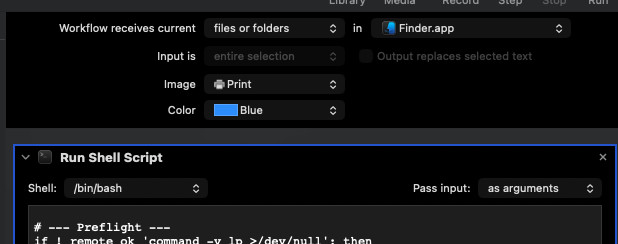
Sonra da su scripti ekliyoruz.
#!/bin/bash
# Print@Home — Finder Quick Action (robust for Automator, PDF MIME + compression)

# No `-e` to avoid Automator silent failures on pipelines.
set -uo pipefail

APPNAME="Print@Home"
REMOTE="printer@192.168.0.52"              # <-- remote host
PRINTER="Canon_TS3300_series_USB"       # <-- exact CUPS queue name

# SSH: disable TTY (-T) so binary stdin is clean; strict batch mode & timeout.
SSH_BASE=(/usr/bin/ssh -T -o BatchMode=yes -o ConnectTimeout=8 "$REMOTE")

# Notifications
notify()    { /usr/bin/osascript -e 'display notification "'"$1"'" with title "'"$APPNAME"'"'; }
notify_err(){ /usr/bin/osascript -e 'display notification "'"$1"'" with title "'"$APPNAME"'" subtitle "Printing failed"'; }

# Remote helpers
remote_ok()  { "${SSH_BASE[@]}" "$@"; }
remote_try() { "${SSH_BASE[@]}" "$@" || true; }

# --- Preflight ---
if ! remote_ok 'command -v lp >/dev/null'; then
  notify_err "Remote unreachable or 'lp' missing"
  exit 1
fi
# Some distros don’t have systemd; tolerate either form:
if ! remote_ok 'systemctl is-active --quiet cups || service cups status >/dev/null 2>&1'; then
  notify_err "CUPS not running on remote"
  exit 1
fi
if ! remote_ok "lpstat -p '$PRINTER' >/dev/null 2>&1"; then
  notify_err "Printer '$PRINTER' not found"
  exit 1
fi
# Enable & accept queue (ignore failure if already enabled)
remote_try "cupsenable '$PRINTER' && cupsaccept '$PRINTER'"

COUNT="$#"
notify "Submitting $COUNT item(s) to '$PRINTER'…"

rc=0
for file in "$@"; do
  if [[ ! -f "$file" ]]; then
    notify_err "Skipping non-file: $(basename "$file")"
    rc=1
    continue
  fi

  title="$(basename "$file")"

  # Build remote command with safe quoting via printf %q
  # We force PDF MIME and read from stdin ('-').
  remote_cmd=$(printf "gunzip | lp -o document-format=application/pdf -d %q -t %q -" "$PRINTER" "$title")

  # Send using gzip->gunzip; capture lp output safely without `set -e`
  jobline=$(
    /usr/bin/gzip -c -- "$file" \
    | "${SSH_BASE[@]}" "$remote_cmd" 2>&1
  )
  status=$?

  if [[ $status -ne 0 ]]; then
    notify_err "lp failed: $title"
    remote_try "tail -n 30 /var/log/cups/error_log | sed 's/^/[cups] /'"
    rc=1
    continue
  fi

  # Extract job id: "request id is PRINTER-NNN (0 file(s))"
  jobid="$(printf '%s\n' "$jobline" | sed -n 's/^request id is \([^-]\+-[0-9]\+\).*$/\1/p')"
  [[ -n "$jobid" ]] && notify "Sent: $title (job $jobid)" || notify "Sent: $title"

  # --- Tight verification: look for this specific job id in active queue
  seen=0
  for ((i=1; i<=15; i++)); do
    q="$(remote_try "lpstat -W not-completed -o '$PRINTER'")"
    if printf '%s' "$q" | grep -Fq "$jobid"; then
      seen=1
      break
    fi
    sleep 1
  done

  if [[ $seen -eq 1 ]]; then
    notify "Observed in queue: $jobid"
  else
    remote_try "echo '--- lpstat (all) ---'; lpstat -W all -o '$PRINTER' | sed 's/^/[queue] /'"
    remote_try "echo '--- cups error_log (tail) ---'; tail -n 40 /var/log/cups/error_log | sed 's/^/[cups] /'"
    notify_err "Job not observed: $title"
    rc=1
    continue
  fi
done

if [[ "$rc" -eq 0 ]]; then
  notify "Done. Jobs submitted & observed in queue."
else
  notify_err "Done with errors. See [queue]/[cups] details."
fi

exit "$rc"