Evde ki printer networke baglanmiyordu önüne bir miniPc baglamistim simdi artik ona PDF dosyalarini direk yazdirabiliyorum.
bunun icin dosyaya sag tiklayip print@home diyorum.
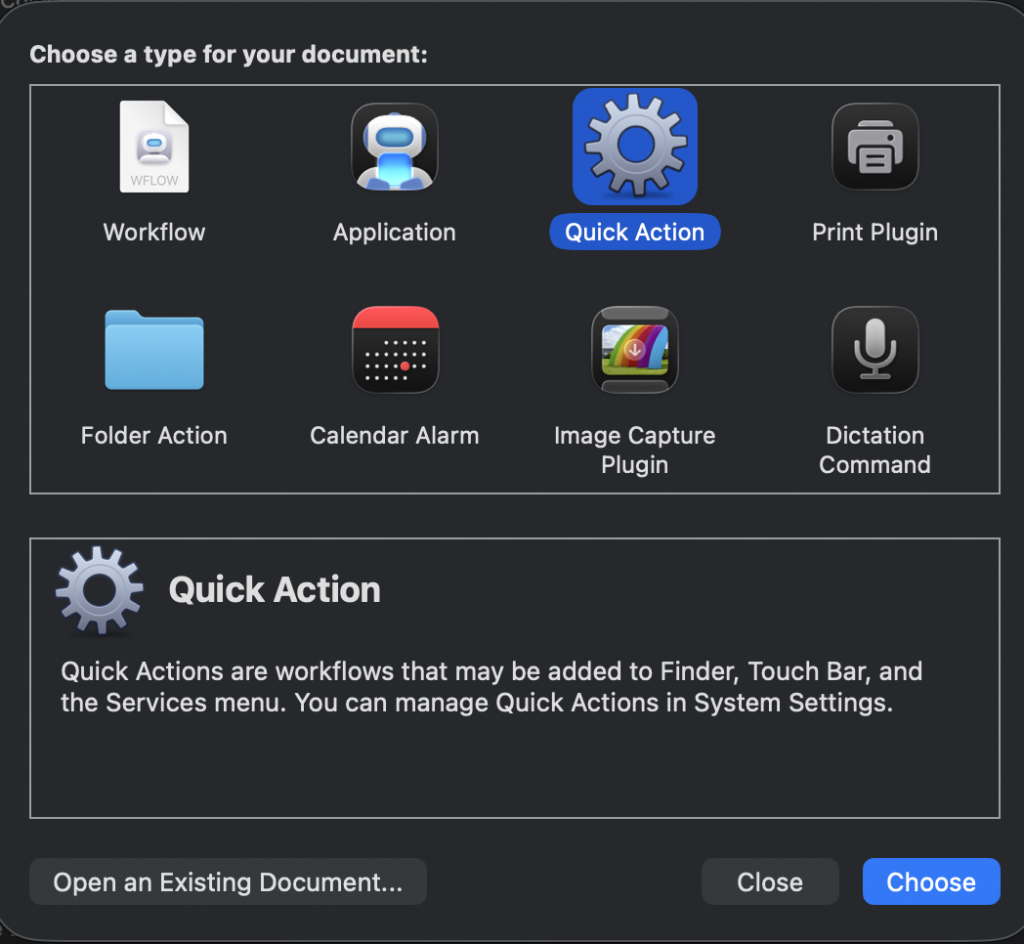
Önce Automator i acip “Quick action” seciyoruz yada new diyip seciyoruz.
sonra asagida ki gibi ayarlayip yandaki menuden run scripti de ekliyoruz.
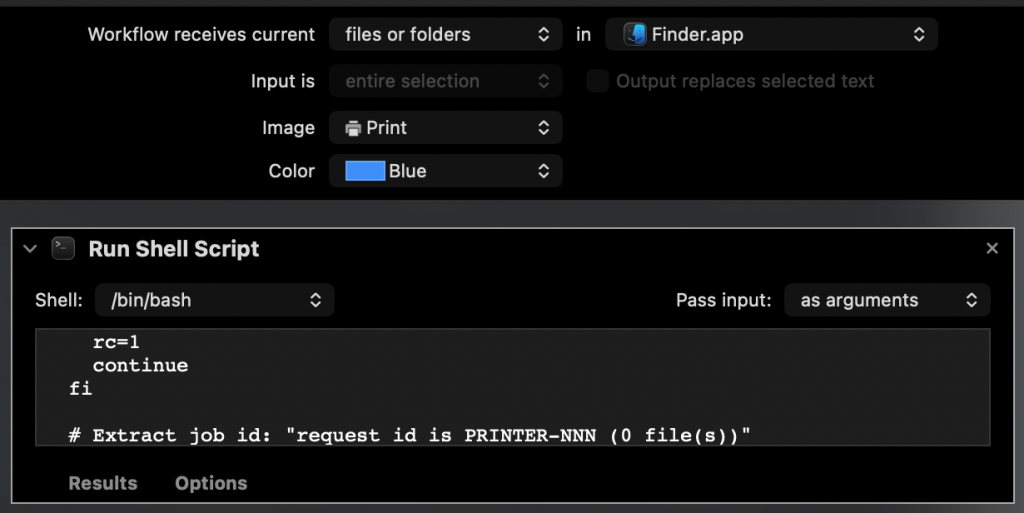
script suna benzer
#!/bin/bash
# Print@Home — Finder Quick Action (robust for Automator, PDF MIME + compression)

# No `-e` to avoid Automator silent failures on pipelines.
set -uo pipefail

APPNAME="Print@Home"
REMOTE="root1@192.168.0.4"              # <-- remote host
PRINTER="Canon_TS3300_series_USB"       # <-- exact CUPS queue name
#PRINTER="Canna-printer"

# SSH: disable TTY (-T) so binary stdin is clean; strict batch mode & timeout.
SSH_BASE=(/usr/bin/ssh -T -o BatchMode=yes -o ConnectTimeout=8 "$REMOTE")

# Notifications
notify()    { /usr/bin/osascript -e 'display notification "'"$1"'" with title "'"$APPNAME"'"'; }
notify_err(){ /usr/bin/osascript -e 'display notification "'"$1"'" with title "'"$APPNAME"'" subtitle "Printing failed"'; }

# Remote helpers
remote_ok()  { "${SSH_BASE[@]}" "$@"; }
remote_try() { "${SSH_BASE[@]}" "$@" || true; }

# --- Preflight ---
if ! remote_ok 'command -v lp >/dev/null'; then
  notify_err "Remote unreachable or 'lp' missing"
  exit 1
fi
# Some distros don’t have systemd; tolerate either form:
if ! remote_ok 'systemctl is-active --quiet cups || service cups status >/dev/null 2>&1'; then
  notify_err "CUPS not running on remote"
  exit 1
fi
if ! remote_ok "lpstat -p '$PRINTER' >/dev/null 2>&1"; then
  notify_err "Printer '$PRINTER' not found"
  exit 1
fi
# Enable & accept queue (ignore failure if already enabled)
remote_try "cupsenable '$PRINTER' && cupsaccept '$PRINTER'"

COUNT="$#"
notify "Submitting $COUNT item(s) to '$PRINTER'…"

rc=0
for file in "$@"; do
  if [[ ! -f "$file" ]]; then
    notify_err "Skipping non-file: $(basename "$file")"
    rc=1
    continue
  fi

  title="$(basename "$file")"

  # Build remote command with safe quoting via printf %q
  # We force PDF MIME and read from stdin ('-').
  remote_cmd=$(printf "gunzip | lp -o document-format=application/pdf -d %q -t %q -" "$PRINTER" "$title")

  # Send using gzip->gunzip; capture lp output safely without `set -e`
  jobline=$(
    /usr/bin/gzip -c -- "$file" \
    | "${SSH_BASE[@]}" "$remote_cmd" 2>&1
  )
  status=$?

  if [[ $status -ne 0 ]]; then
    notify_err "lp failed: $title"
    remote_try "tail -n 30 /var/log/cups/error_log | sed 's/^/[cups] /'"
    rc=1
    continue
  fi

  # Extract job id: "request id is PRINTER-NNN (0 file(s))"
  jobid="$(printf '%s\n' "$jobline" | sed -n 's/^request id is \([^-]\+-[0-9]\+\).*$/\1/p')"
  [[ -n "$jobid" ]] && notify "Sent: $title (job $jobid)" || notify "Sent: $title"

  # --- Tight verification: look for this specific job id in active queue
  seen=0
  for ((i=1; i<=15; i++)); do
    q="$(remote_try "lpstat -W not-completed -o '$PRINTER'")"
    if printf '%s' "$q" | grep -Fq "$jobid"; then
      seen=1
      break
    fi
    sleep 1
  done

  if [[ $seen -eq 1 ]]; then
    notify "Observed in queue: $jobid"
  else
    remote_try "echo '--- lpstat (all) ---'; lpstat -W all -o '$PRINTER' | sed 's/^/[queue] /'"
    remote_try "echo '--- cups error_log (tail) ---'; tail -n 40 /var/log/cups/error_log | sed 's/^/[cups] /'"
    notify_err "Job not observed: $title"
    rc=1
    continue
  fi
done

if [[ "$rc" -eq 0 ]]; then
  notify "Done. Jobs submitted & observed in queue."
else
  notify_err "Done with errors. See [queue]/[cups] details."
fi

exit "$rc"
Bu script ssh kullandigi icin ssh keyimi önceden printer hostuna yüklemistim.